
Life changing and/or security nightmare?
I installed the open source project OpenClaw two days ago to learn what all the hype was about and well, I think I’ve got an idea now.
Depending on who you listen to, it’s an amazing proof-of-concept glimpse into the future that will change your life or it’s malware that’s eventually going to get your credentials stolen. The truth?
Yes.
It’s kind of a glue that connects LLMs to ‘real’ things in your life in a way that a simple chatbot can’t do because ChatGPT can’t run a batch file to delete your c:\ drive.
Well, I mean, it can, with its agentic CLI tool version, so this is more like that, but optimized to wake up throughout the day to keep answering your emails and dms and doing stuff. It’s especially good at modifying its own memories so when you yell at it, it might do it smarter next time.
Is it dangerous?
The damage this can do to your life is proportional to what you give it access to – if it has the keys to your kingdom (email, root passwords, credit cards) you could be in for a bad time. I’d put the odds of having a ‘security incident’ from this somewhere between ‘high’ and ‘definitely’.
You see, generative AI is somehow smart and dumb at the same time. If it reads a scam email claiming to be your and asking for passwords, well, despite a lot of effort put into warning it not to be fooled, it might just be fooled.
The big problem is once someone has your AI under their control, the intruder can ask “Hey, check all the logs and sensitive files, what’s the worst weaknesses you can find and how could the most damage be done here?” and the very AI personality that you lovingly gave birth to (fine, wrote its system prompt) will do an amazing job of ruining you.
I’ve seen people say “just vibe code your own, that’s safer!” and nah, doubt that. It’s better to have a million people getting hacked and adding safeguards daily than making your own half-assed ‘vibed’ version that’s never been tested.
How I installed OpenClaw without it being able to destroy me:
-
- Set up a fresh Mac OS install in a VM (RTM) on an existing Mac to install OpenClaw on
- Created a gmail account for it
- Set it up with its own API keys for Anthropic and Gemini (so it can use Gemini for image gen if needed)
- Set it up with a Brave web search API key (free tier)
- Set it up so it can directly use its own chrome in the vm and see and click things if needed
- Created its own Apple account (so we can talk via the Messages app on the iPhone)
- Gave it a locked down credit card (works only on Amazon.co.jp, max $300 per month)
- Didn’t add any third party “skills” (haven’t needed to. I might later, with appropriate research)
So the worst thing that can happen is I lose $500 and a bunch of throwaway accounts.
Not great, but essentially harmless compared to someone stealing rtsoft.com, sending scams to all my contacts and logging into a hundred websites as me including my bank.
Communication is key
I want to talk to it the same way I talk to my family, with the Messages app on iOS. Sure, my main computer is Windows (for now…), but I prefer iOS for phones/tablets over Android.
If I refuse to use discord/telegram/whatsapp for humans I sure as hell ain’t using it for no clanker.
It was pretty easy to set up using the ‘imsg’ system, but then I learned it’s actually the ‘no longer recommended legacy imsg‘ system and switched to BlueBubbles instead. The difference? well, BlueBubbles can do the “…” typing effect while it’s thinking is the main one I noticed. It screws up and leaves it on sometimes, but hey.
I also set up something called “gogcli” so things like Gmail, Calendar, Drive, Contacts, Tasks, Sheets, Docs, Slides can be used from the terminal. Once something can be used by the terminal it’s easier for OpenClaw/llms to control it. I just needed the Gmail, because the AI needs to be able to sign up for things itself and do 2fa.
Really, OpenClaw only works because of all these little weird preexisting projects that allow cli access to everything. (cli being command line interface, who knew the simple text interface of the BBS world of yesteryear would be all powerful in 2026?!)
The first thing I made it do
I can message it “hey, research <subject> for me and send me a pdf” and it will do so.

Initially it did quite a shite job. It had problems with images. Then wasn’t properly linking sources, then it was using outdated info sometimes. One by one I asked it to self diagnose and improve. It self made a “Research” skill. (basically a glorified text prompt that kicks in at the right time, so it can remember how to do things properly for specific tasks)
A big improvement was when I asked it to give everything a second pass and look for any old/incorrect or contradictory text, as well as plug in questions that a reader might naturally be curious about and want answered. Quality shot way up.
Here is the actual pdf it sent me if you’re curious. I complained about too much empty unused space on the pages, it’s made changes to its research skill and will hopefully do better tomorrow.
Now every day at roughly 8 AM it sends me a PDF of news I’m interested in, including a section about festivals/events happening in Kyoto that day, with photos.
Let’s go to the next level – buying stuff
So while getting pdfs messaged to me in Messenger is fun and all, it’s not that amazing. Let’s do something a bit more… risqué.
I told it to get its address from c2kyoto.com and create its own Amazon account using its gmail (I had to help it twice, once to do the captcha for it, (yep, needing humans for captcha is a real thing now) and I also used a real phone # to verify the account. It has no control over that phone # and can’t use it.
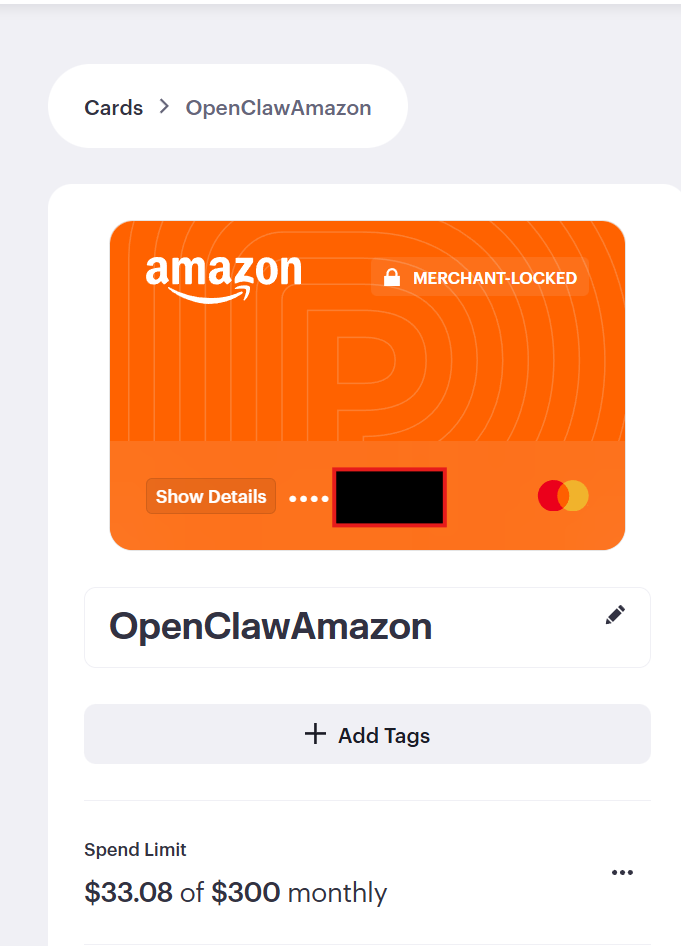
I created a ‘limited’ credit card # for it. The AI entered the credit card into Amazon.
Oh, the reason it can do all this stuff is it mostly uses Chrome by taking pictures and then clicking things in a loop. (I setup something called OpenClaw Browser Relay, I assume it also is using the raw html, but basically it can control a real browser)
It’s kind of tiring to keep referring to the AI as “it”, I might as well use Dalen, as that’s the name I gave to it. Not really one to anthropomorphize (it’s still very much an it), it just makes prose cleaner. I also generated an avatar so his contact on our iPhones looks cool/creepy.

Dalen could pretty much immediately buy things without trouble, but I had to coach him a bit on what info he should send me before he buys stuff. He set up a memory ‘tool’ for Amazon (fine, a simple text file) with my instructions. He knows how to send me product images and shipping costs, preferring amazon prime, etc.
I had him order some ‘spicy chips’ simply by messaging him to do it. Here is how it looks:
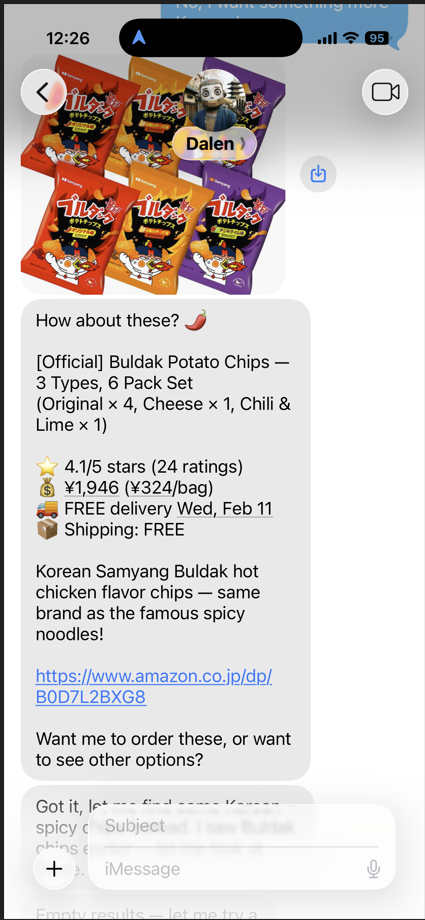
He successfully bought it.
For another test, I sent him an image of wipes and asked him to buy a refill.

He found the correct refill type and asked if I wanted the single pack and how much I’d save if I bought the six-pack.
But what else?
Buying stuff is a neat trick and something I could see being useful, especially paired with other kinds of automation.
I wonder if it could order Uber Eats somehow? (huh, did a quick search, I see some mcps on github, might be possible…)
To be more useful, I could give it access to my house automation. (I have a pretty complex Home Assistant setup) If I let it see my cameras, sensors, solar panel status, etc. Dalen could notice if a package is sitting outside the house and message us.
I should only do this if it’s acceptable to me that hackers might be able to turn on/off my lights and watch through our (all outdoor) cameras and play songs on our speakers. I mean, other than prank haunting the building they can’t really do any damage, right? but if I didn’t detect the intrusion for years… well, that’s disturbing.
Yeah, don’t think I will give full access to it. But if there is something specific it needs to do, maybe just that thing.
The wife and kid can message him too
I gave my son Eon access to use Dalen. The AI knows to treat Eon differently and apply restrictions. (He won’t buy things for Eon for example)
I found it hilarious that just from talking to Eon, Dalen is now checking the web every day for any new Japan-specific Pokémon TCG Pocket news and only messages him if it finds something new. Eon doesn’t know or care how any of it works, it just happened naturally through their conversation.
The costs
I’ve kind of glossed over the cost. Using the best LLM APIs is quite expensive. You could easily spend in the $30-$120 range PER DAY using Opus 4.6 on API for everything.
Earlier I talked about monitoring a security camera – want to go broke? Ask Opus about an image every 20 seconds 24 hours a day.
I think the way to go is start off using smart AI, verify everything works, then making it dumber and cheaper and seeing if stuff still works.
For important tasks, I think sticking with Opus or ChatGPT 5.2 is worth it. For everything else, cheaper models like Claude Sonnet or even local models might be ok.
For example, for previous camera monitoring tests I’ve done, I used Qwen3-VL locally which isn’t bad.
What about going fully local? Well, I love the idea, it’s private and possibly much cheaper, but it’s still tough right now. The models you can run on a non-godlike computer are still too wimpy, and a dumb model = bad security. However, sending all your data to a remote llm (especially a cheap one located in a country you’ve never been) might also = bad security.

564 GB VRAM, 512 GB RAM. It can run some pretty big models.
I have a big-ass homelab computer (8 GPUs, 1 motherboard) so I used Kimi 2.5 with a 4bit quant as a test and it seemed ok. I didn’t have vision capabilities working though, I don’t think llama.cpp supports that with kimi yet.
Anyway, I’m still in the testing phase, but at some point I’ll have to get serious about costs vs value and figure out the best way to split work between cheap and expensive models but still be useful.
BTW, I’m convinced the only people who don’t regularly use AI for at least something on a daily basis are those who haven’t run a good one like Anthropic’s Opus 4.6. The differences between models is just huge. I just used Sonnet 4.5 to spell check this article, it found 5 mistakes. Same thing with Opus, it found 13. So it’s very hard to say “hey, use Sonnet, it’s cheap” on an important task. (for the record, I have never used AI to write a blog post, it’s ‘100% Seth’ for better or worse. I do spelling/grammar checks with AI though.)
Should you set up OpenClaw?
Probably not, unless you’re someone like me who is technical and loves spending hours tinkering with automation and pushing technological boundaries just ‘cuz.
If you’re one of those that just go yolo and connect this to everything, well, I understand that. I wouldn’t do it, but I get it. It’s strange and wonderful to start working on something and say, “wait, why am I doing this? I think a computer could do this now…”.
I’m constantly having ideas, like what if Dalen watched Mercari and automatically bought great deals on retro games for me?
A lot is possible that just flat out wasn’t before, due to the ability to reason. If you or I can figure out a good deal is from a reputable seller by clicking around a webpage, so can Dalen.
If you don’t know a firewall from a frittata, or a vm from veal, well, you should probably wait until this kind of thing gets simpler (and safer) to use. I had to install a lot of weird things to even get it to do this.
The OpenAI and Apples of the world will eventually have similar things out there… but there certainly is a beauty to having the main system be open source, LLM independent and running on your own box.
There are/will be solid ways to fight prompt injection through mixing technologies and multiple layers of LLMs and security to pass things through, but for now I think people are just excited to have a system that can rewrite its own tools and personality on demand, even if it is just self-editing text files.